Oak Cliff Software builds AI automation for Dallas–Fort Worth businesses that want help with that kind of work without handing over control. The AI reads, sorts and drafts. Your people review and approve the steps that carry real consequences.
Three jobs AI does well in day-to-day operations
AI is useful when a task is repetitive, heavy on text and easy for a person to check. It is a poor fit when one wrong answer is costly and nobody is looking. Most good uses of AI automation fall into three groups.
A good test is to ask whether a new hire could do the task after a short explanation and a few examples. If yes, AI can often prepare a solid first draft. If the task depends on deep experience and judgment, AI is better used to gather information for the person who makes the call.
Each of these saves the most time when it sits inside the tools your team already opens, rather than in a separate chat window someone has to remember to visit.
- Reading documents: pulling key fields from invoices, work orders, intake forms or delivery slips into a draft record
- Answering questions about your work: letting staff ask what is overdue at their site or what a customer last ordered, using your own records
- Preparing the next action: drafting a reply, a quote line or a task, then placing it in the right person's queue for approval
People approve what matters
We design every AI step with a clear point where a person decides. The AI can propose a vendor payment, but someone approves it. It can draft a reply to a customer, but a staff member sends it. It can flag a job as at risk, but the owner of that job chooses what to do next.
That is how we think about AI automation for Dallas operations teams: helpful drafts, human decisions. It keeps accountability where it belongs and makes the system easier to trust. It also gives you a record of what the AI suggested, what was changed and who approved it.
As confidence grows in a specific step, you can choose to let low-risk items move through with lighter review. That choice stays with you, step by step.
- 1 Information arrives
- 2 AI reads and sorts it
- 3 Person reviews
- 4 System records the decision
- 5 Next step starts
Connecting AI to the systems you already run
AI is only as useful as the information it can reach. Our AI integration services connect it to your accounting, scheduling, CRM, point of sale or job management tools where the vendor's APIs or integration options allow. When a tool cannot connect directly, we look at exports, a shared inbox or a small custom database as a bridge.
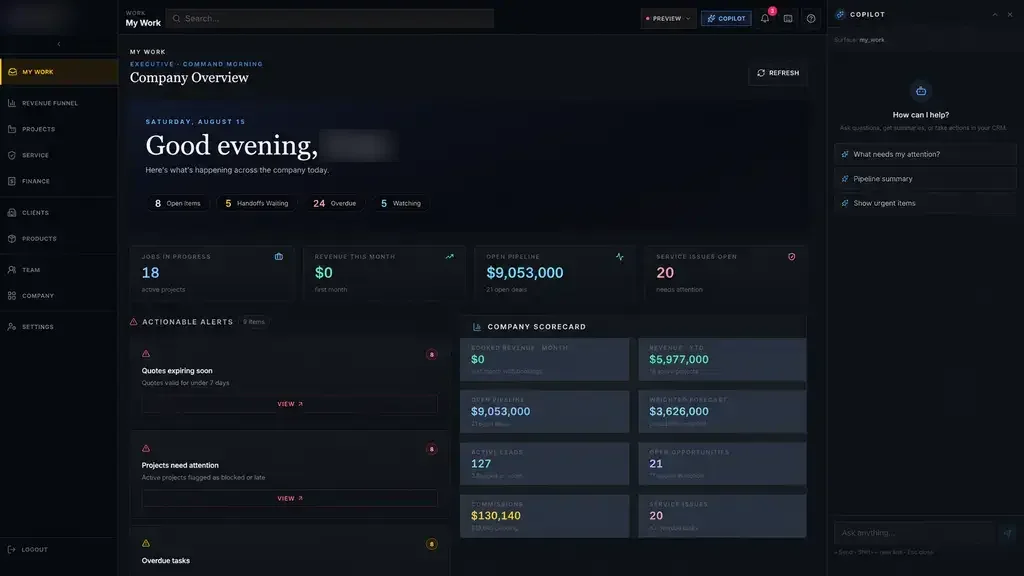
Clean structure matters more than clever prompts. On our Industrial Operations Platform, handoffs from quote to engineering to purchasing are recorded state changes, and leadership sees exceptions like a quote expiring or material running late. Structured records like those give AI automation in DFW clear data to read and a clear place to put its suggestions.
We also plan for the AI being wrong. Every draft shows where its information came from, uncertain items are flagged instead of guessed, and anything the AI cannot read goes to a person's queue rather than disappearing. Those habits matter more than which model sits underneath.
✕Staff retype invoice details into accounting by hand.
✓AI prepares the entry and staff approve it.
✕Managers check each system to find late work.
✓Staff ask what is late and get a list.
✕Customer emails wait until someone has time.
✓Emails are sorted and replies drafted for review.
✕Each office names statuses its own way.
✓Shared definitions let AI read every site consistently.
✕Nobody knows who changed what or why.
✓Every suggestion, edit and approval is recorded.
AI that respects the lines between your locations
In a multi-location business, the same question gets asked at every site. A dental group with offices in Frisco and Irving, or a service company running crews out of Arlington and Denton, needs AI that follows the same boundaries people do.
AI for operations works best when the underlying data already uses shared definitions. If one office calls something pending and another calls it waiting, we fix that first, so answers mean the same thing everywhere.
- Staff questions are answered from their own site's records
- Leaders can ask across sites and compare locations
- Each location sets who reviews AI drafts
- Shared definitions keep answers consistent from office to office
Start with a pilot at one location
We do not recommend rolling AI out everywhere at once. A better path is to pick one task, at one location, with staff who are willing to give honest feedback.
During the pilot, the team uses the AI drafts in their normal day. We watch where it gets things right, where people correct it and where it slows them down. Then we adjust the instructions, rules and screens before the next site comes on.
Before the pilot starts, we agree on what success looks like in plain terms. Are drafts accepted with light edits? Do staff spend less time on the task? Are fewer items slipping through? Those answers come from your team, not from a vendor's demo.
This follows the same process we use for all our work: Discover, Design, Build, Launch, Optimize. A focused AI automation pilot in Dallas gives you real evidence from your own staff before you decide to expand.
The system handles
- Reading and sorting incoming information
- Finding the right procedure or record
- Drafting summaries and replies
Your people decide
- Approving anything that leaves the building
- Decisions that need expertise
- Handling the unusual cases
Questions to ask before hiring an AI partner
Plenty of firms now describe themselves as an AI automation agency. Before you sign with any of them, including us, ask a few direct questions and listen for plain answers.
Our answers are simple. People approve what matters. You own the code and the data. We connect where the vendor's APIs or integration options allow, and we tell you when a task is not a good fit for AI at all.
- Where exactly will a person review or approve the AI's work?
- What happens when the AI is unsure or wrong?
- Which of our systems will it connect to, and how?
- Who owns the code, the instructions and the data?
- How will we know whether the pilot is worth expanding?