Oak Cliff Software offers custom software development for Dallas–Fort Worth businesses that want one system shaped around their real routines. We build for single-site companies and for groups running several locations, and you own the code and the data when the work is done.
Signs your business has outgrown off-the-shelf tools
Packaged software is a good choice when your process matches the vendor's idea of how things should run. Trouble starts when it doesn't, and your team spends more time working around the tool than working with it.
These are the patterns owners and operations leaders describe most often. If two or more sound familiar, custom software development is worth a serious look. It does not have to replace everything at once. Often the right start is one tool that removes the worst handoff in your week.
- The same customer or job is entered in three places, and the copies rarely agree.
- Each location tracks the work its own way, so totals never line up.
- Approvals happen in text threads and get lost when someone is out.
- Reports take a day of copying and pasting before every leadership meeting.
- One employee is the only person who understands how the spreadsheet works.
What we build, from one sharp tool to a connected system
Some projects are small and focused: a quoting tool, an intake form that feeds a work queue, or a dashboard that pulls numbers from systems you already use. Others connect several departments so a job moves from sales to operations to billing without anyone retyping it.
Our Industrial Operations Platform is an example of the larger kind. It follows one digital thread from inquiry and quote through engineering, purchasing, production, ship and install, and on to asset and service. Every handoff is a recorded state change. Leadership sees the exceptions that need attention, like a quote about to expire, material running late or a site that is not ready, each with an owner and a next action.
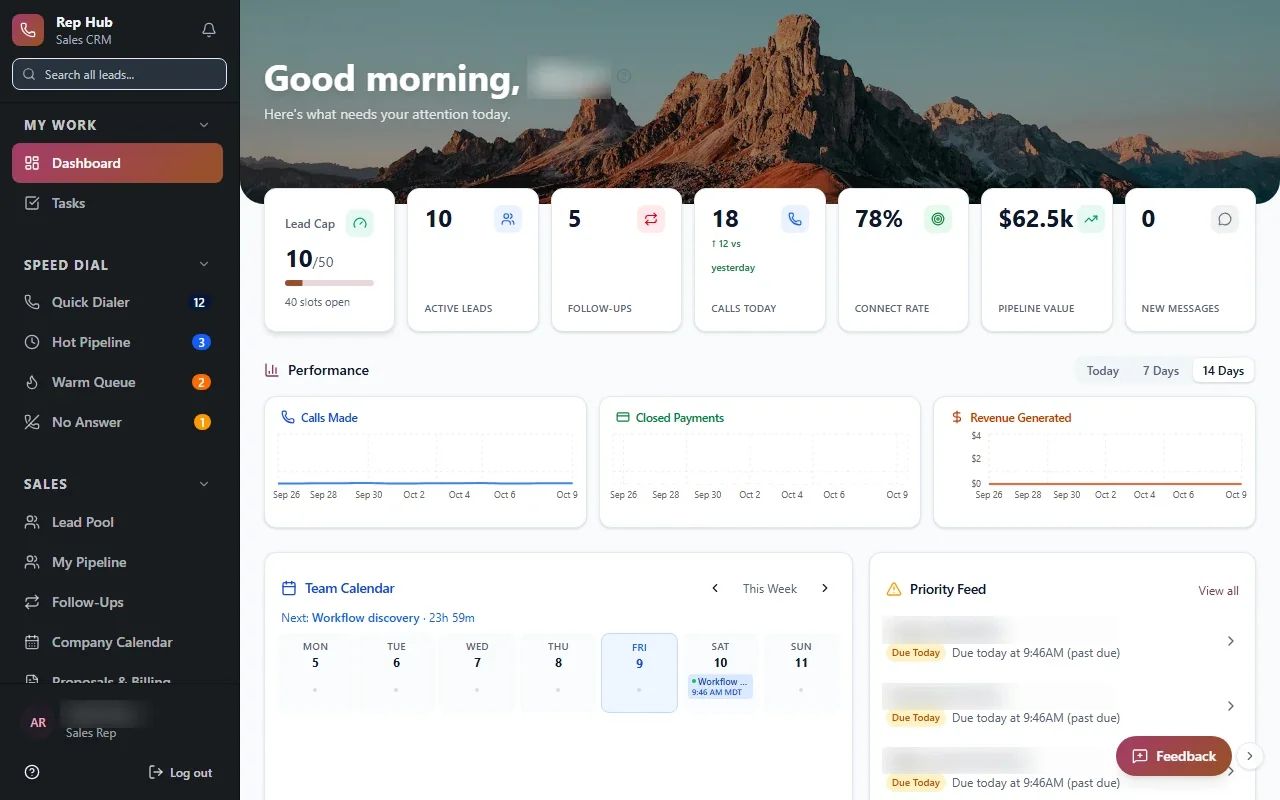
Rep Hub shows a different shape. It connects recruiting, training and a rep workspace for leads, calls, proposals and contracts. When a deal is signed and paid, that triggers activation, delivery and commissions, so nobody has to chase the next step by hand.
- 1 Understand the work
- 2 Map the system
- 3 Build the first release
- 4 Use it for real
- 5 Extend it
Built for businesses with more than one location
Our specialty is software for practice groups and companies running several sites. Picture a dental group with offices in Plano and Arlington, a service company with crews based in Fort Worth and McKinney, or a property group managing buildings across Dallas County.
In these businesses, the hard part is rarely any single office. It is keeping shared definitions across every site while letting each location set its own owners and routines. Custom software development for a Dallas multi-location group starts there, with one shared view and room for how each office works.
- Shared definitions for jobs, statuses and services across all sites
- Local settings for who owns each step at each location
- Cross-site views so leaders can compare locations and spot problems early
- Access rules so staff see their own site and leaders see across sites
✕The same job is typed into three different tools.
✓Each job is entered once and follows the work.
✕Each location tracks work its own way.
✓Every site shares definitions, with local owners and routines.
✕Approvals live in text threads and get lost.
✓Approvals are recorded steps with a clear owner.
✕Reports take hours of copying before meetings.
✓Leaders open one cross-site view whenever they need it.
✕Only one employee understands the spreadsheet.
✓The process lives in software the whole team uses.
How a project runs: Discover, Design, Build, Launch, Optimize
Discover is where we learn how the work really moves today. We talk with the people who do it, not only the people who manage it, and map the handoffs where things get stuck or dropped.
Design turns that map into screens and rules you can react to before anything is built. Build is where you see and test working software as it comes together, so your feedback shapes the product while changes are still easy to make.
Launch is a staged rollout. For multi-location clients we usually pilot at one location with its own staff, fix what they find, then bring the next site on. Optimize is the ongoing work of tuning the system as your business changes, adds services or opens new offices.
Start with a focused first release
Big projects tend to stall when they try to do everything before anyone uses anything. We would rather put a smaller, useful release in front of your team and build from what they tell us.
A good first release solves one painful problem from start to finish. For a property group, that might be a maintenance request that moves from a tenant's photo to review, assignment, updates and closure, which is the core of our Property Management Platform, now in build. For a roofing contractor, it might be the front half of a quote. Our Roofing Quote Tool concept starts from an address, prepares measurements for the roofer to verify, and applies pricing rules to a draft quote.
Choosing the right first release is a big part of how we approach custom software development in Dallas. It keeps the investment focused and gives your people a working tool they can judge for themselves.
The system handles
- Assigning the next step
- Reminders and follow-ups
- Status updates between teams
Your people decide
- Judgement calls and approvals
- Customer conversations
- Exceptions that need a person
Choosing a software development company in Dallas
If you are comparing a software development company in Dallas against a national firm or a freelancer, ask practical questions. Who will you talk to each week? Will you see working software before launch? Who owns the code when the project ends? What happens if the first plan turns out to be wrong?
When you evaluate any custom software development company, those answers matter more than a portfolio of screenshots. At Oak Cliff Software, you work with a team led by co-founders Taylor Moses and Jamison Dyal. You own the code and the data. We connect to the tools you already use where the vendor's APIs or integration options allow, and we explain trade-offs in plain English.
Working with a software company in Dallas also means we can meet your staff on site at a location in Irving or Richardson during discovery and the pilot. Those visits tend to surface details that a video call misses.