Oak Cliff Software builds client portal software for Dallas–Fort Worth businesses that want clients, owners, tenants or partners to see their own information without asking. The portal is a window onto the same system your team uses, so status is current, documents have one version, and requests arrive with the details you need.
What a client sees the first time they sign in
We design the portal from the client's side first. A typical first visit looks like this:
That last item matters. The best client portal software asks clients to do small, clear things, and makes it obvious when something is waiting on them rather than on you. Clients who know exactly what is needed from them are far less likely to stall the work.
- They sign in with an email link or an identity provider you already use, so there may be no new password to forget.
- They land on a summary of their own account: open requests, recent updates and anything waiting on them.
- They can see which of your locations is handling their work and who their contact is.
- They can submit a new request, upload a file or approve something in a few clicks.
Many offices behind one front door
If you run several locations, your clients should not have to know how your business is organized. A customer of your Garland branch who moves to a property near Frisco should keep the same login, the same history and the same documents.
Behind the portal, each request is routed to the right location and owner using the same shared definitions every site follows. Staff see requests for their own site. Leaders see across sites. The client sees one consistent experience.
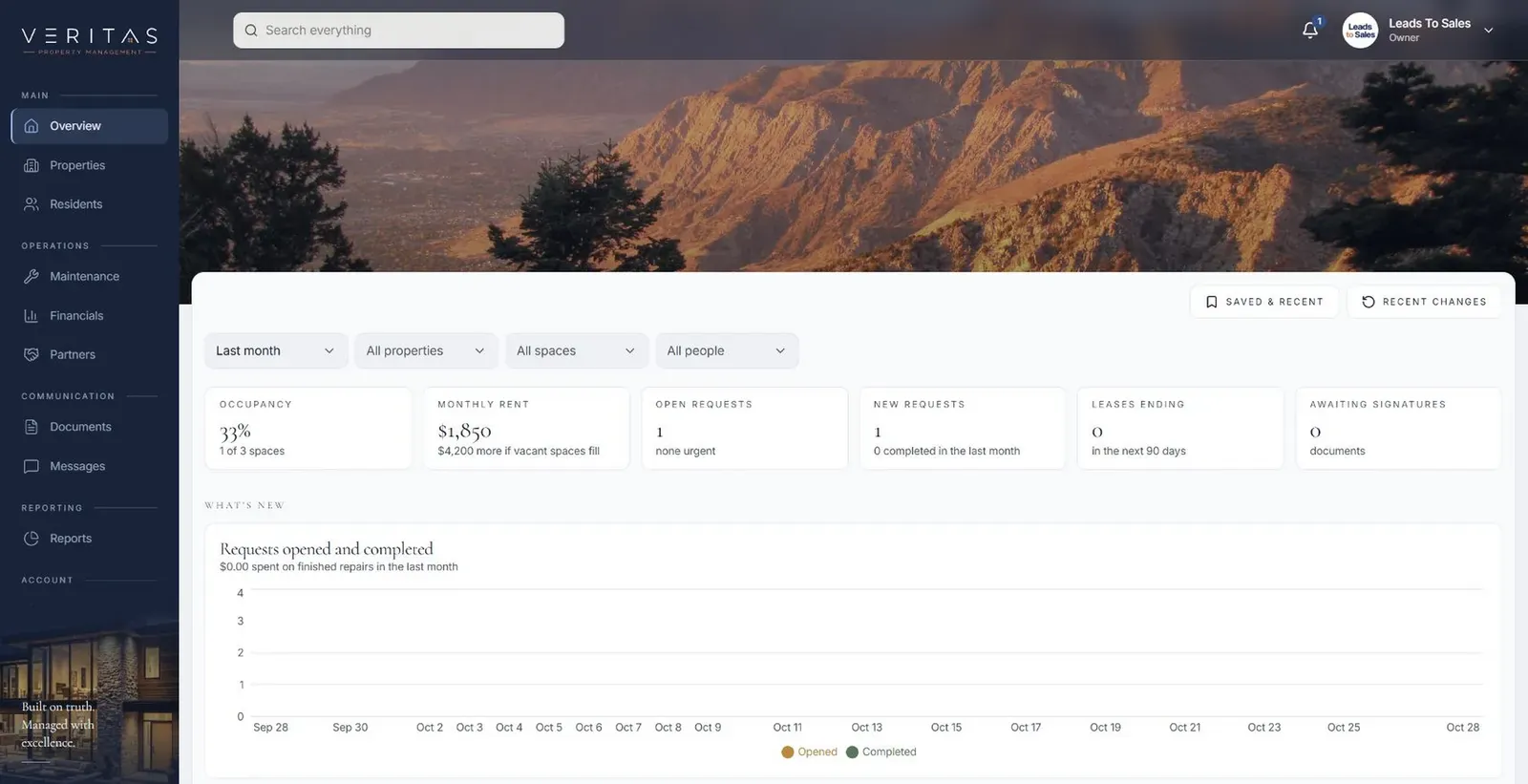
Our Property Management Platform, currently in build, follows this pattern. Tenants, owners and staff each have their own portal views over one workspace that covers many properties. A tenant submits a maintenance request with photos, and it is tracked through review, assignment, updates and closure. A vendor phase is proposed for later. It is a good picture of what client portal software for Dallas businesses with many sites can look like when every party sees their part of the same record.
- 1 Client signs in
- 2 Sees their view
- 3 Submits a request
- 4 Team responds
- 5 Trail is recorded
The questions clients stop emailing about
A useful way to scope a portal is to look at your inbox. Which questions do clients ask over and over? Each one is a candidate for something they can see on their own.
We usually start a first release with the few questions that create the most back-and-forth. For many DFW service businesses, request status is the natural starting point. Starting narrow keeps Dallas client portal software focused and useful from the day clients first sign in.
- Where is my request, and who is working on it?
- When is the next visit or appointment?
- Did you get the document I sent?
- What do I still owe you, and what do you still owe me?
- What did we agree to last time?
✕Clients email or call to ask for status
✓Clients see live status for their own requests
✕Documents travel as attachments in several versions
✓One current version stored with the right client
✕Requests arrive missing photos or details
✓Request forms ask for what your team needs
✕Clients must know which office to contact
✓One portal routes work to the right location
✕Vendors get access to everything or nothing
✓Partners see only the jobs assigned to them
Documents with one current version
Attachments are where client relationships get messy. A contract goes out, comes back with edits, gets forwarded, and now three versions exist in three inboxes.
Secure document sharing in a portal fixes the basics. Each document lives in one place, attached to the right client and the right request. Clients upload what you ask for, and your team sees it arrive instead of hunting through email. Signed versions are stored with a record of who signed and when. Reminders go out for documents that are still missing, and stop when the document arrives.
For groups handling sensitive records, such as a therapy practice with several clinics, we build for HIPAA-regulated workflows: access by role and location, recorded activity, and careful choices about what can be downloaded.
Deciding what clients see and what stays inside
A portal is only as trustworthy as its permissions. Every record carries its own access rules. A client sees their own information. Internal notes, pricing logic and staff discussions stay internal unless you choose to share them.
Outside partners are a common middle case. A vendor may need to see the jobs assigned to them, upload photos and mark work complete, without seeing your other clients or your margins. We define each type of user and what they can do, then test those rules before launch, including checks that one client can never see another client's records.
These decisions belong at the start of client portal software design. We work through them with you during Discover and Design, and document them in plain language so your team knows exactly what each user can see.
The system handles
- Status updates to clients
- Document reminders
- Access by role
Your people decide
- Answering questions
- Approving changes
- Managing the relationship
Inviting clients in, one location at a time
We do not launch a portal to every client at once. Client portal development goes better with a focused first release, offered first to clients of one location, often with staff who already know those clients well.
During Build, your staff see and test working software. During the pilot, a small group of clients use it for real requests, and we watch where they hesitate. Then we adjust and open it to the next location with its own settings and contacts.
You own the code and the data. The portal connects to your other systems, such as calendars or accounting, where the vendor's APIs or integration options allow. For Dallas–Fort Worth businesses, that means your client portal software grows with you instead of becoming one more login to manage.