Oak Cliff Software builds business management software for Dallas–Fort Worth companies that want customers, work, people and money in one connected system. We do not ask you to replace everything at once. We find the part that hurts most, build that well, and connect the rest over time.
A quick test: how many places hold the same customer?
Pick one recent customer and try to answer a few questions about them. What did we quote? Who is working on their job? What documents did they send? Have they paid? If those answers live in four different tools, and two of them disagree, you have found the problem this kind of system solves.
The cost is rarely one big failure. It is many small ones. A salesperson promises a date that operations never saw. An invoice goes out without the change order. A new hire spends their first week learning where things are kept instead of doing the work.
If several of the signs below sound familiar, it is worth talking about business management software for your Dallas team, even if you are not ready to build yet. Knowing where the gaps are helps you decide what to fix first.
- The same customer typed into more than one system.
- Status updates that happen in chat and nowhere else.
- A weekly report someone assembles by copying and pasting.
- Handoffs between teams that depend on someone remembering to send an email.
One thread from first contact to final invoice
Good business management software follows the work the way your business actually does it. A customer becomes a job. The job is assigned to people. Work gets done, documents are attached, the job is completed and invoiced. Each step is a recorded change on one record, not a message passed between tools.
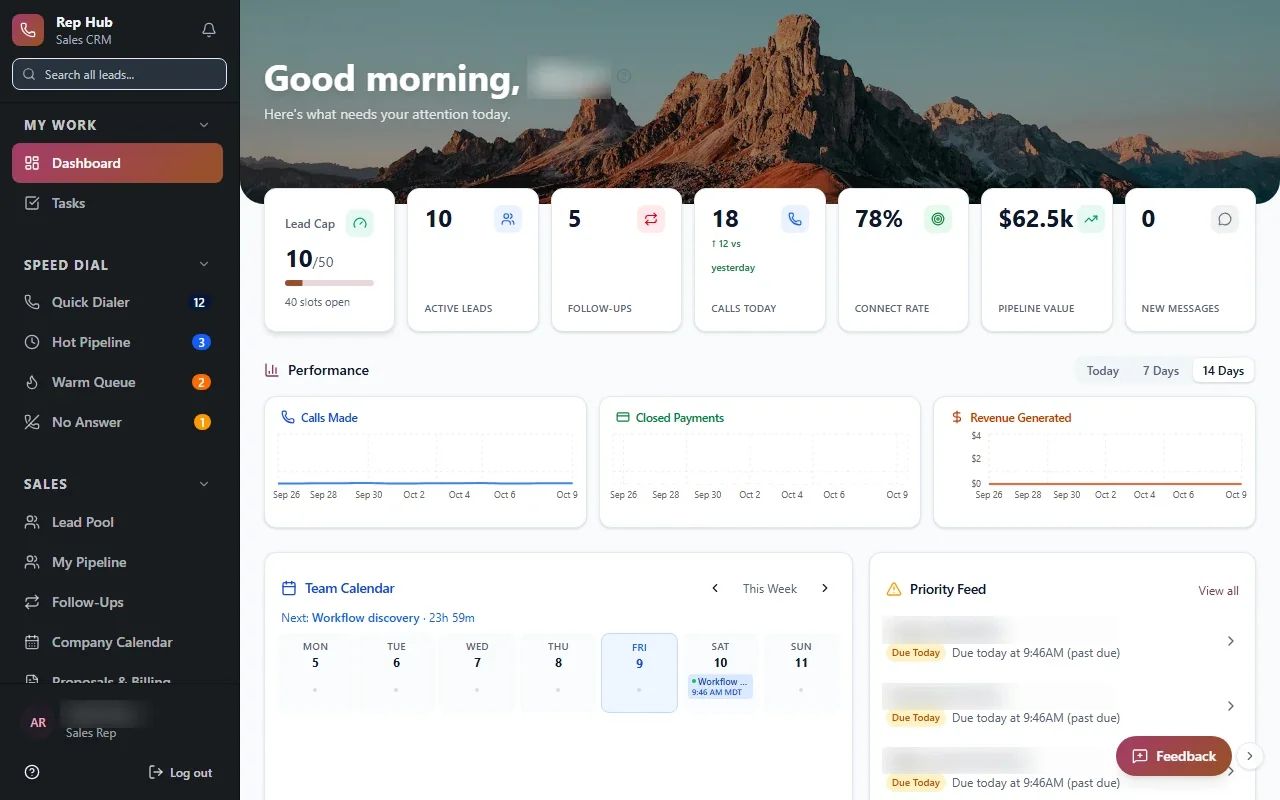
Our Industrial Operations Platform is built on that idea: one digital thread from inquiry and quote through engineering, purchasing, production and installation to service, with every handoff recorded. Rep Hub does something similar for a sales organization, where a signed and paid contract triggers activation, delivery and commissions without anyone retyping the deal.
Your thread will look different. A professional services firm might run from inquiry to engagement to deliverables to billing. A trade contractor might run from estimate to schedule to completion to invoice. The shape is the same: one record, many steps, clear owners.
- 1 Customer
- 2 Job
- 3 Assigned work
- 4 Completed
- 5 Invoiced and reported
A workspace for each role, not one screen for everyone
An all-in-one business system fails when it shows everyone everything. Sales wants their pipeline. Operations wants today's jobs. Finance wants what is ready to bill. Leadership wants exceptions. We design role workspaces so each team opens the system and sees the work it owns, with the rest a click away.
Access follows the same logic. If you run more than one location, staff see their own site and leaders see across sites. A company with offices in Irving and McKinney can keep each office's jobs separate day to day while leadership compares both. We document who can see what before launch.
Think of it as operations software for the whole company rather than one department. Field staff get simple phone screens for updating jobs and adding photos. Office staff get fuller views for scheduling, documents and billing. Everyone works on the same records, so an update from the field shows up in the office as soon as it is saved.
✕The same customer lives in several tools
✓One customer record linked to every job and invoice
✕Handoffs depend on someone sending an email
✓Handoffs are recorded steps with an owner and status
✕Managers rebuild the same report every week
✓Live reports update as jobs move
✕New hires learn where things are hidden
✓Role workspaces show each team the work it owns
✕Each new office adds another spreadsheet
✓New locations are added to the same system
Reports that update as the work happens
When the work is recorded in one place, reporting stops being a weekly project. Numbers update as jobs move. A manager can see what was quoted, what is in progress, what is late and what is ready to invoice without asking anyone to pull it together.
The trick is agreeing what each number means first. "Completed" should mean the same thing in every team and every location. We settle those definitions with you during Discover, because a report is only as useful as the agreement behind it. For DFW businesses with several offices, that agreement is what lets leaders compare sites fairly with their business management software.
Choosing the first piece to build
We start with a focused first release, and the hardest decision is what goes into it. Usually the right answer is the step where work falls through the cracks most often, such as the handoff from sales to operations or from job completion to invoicing.
Then we ask practical questions. Which tools are worth keeping for now? Which ones can share data where the vendor's APIs or integration options allow? Which spreadsheet can be retired first without upsetting the team that relies on it? Custom business software built this way replaces your patchwork one piece at a time instead of in one risky switch.
You see and test working software during Build. If a screen does not match how your team works, we change it before launch rather than after.
The system handles
- Handoffs between teams
- Reminders and approvals
- Reporting
Your people decide
- Customer relationships
- Pricing
- Priorities
Growing into it, and owning it
Business management software in Dallas should grow with the company, not cap it. New teams, workflows and locations are added to the same system. Opening an office in Frisco or Fort Worth becomes configuration: add the site, its people and its access rules, and it shows up in the same reports.
You own the code and the data. That means no per-seat surprises when you hire, no vendor deciding which features you get next, and no lock-in if you choose a different team to maintain it later. We keep improving it after launch as part of the Optimize stage, guided by how your people use it.