
Dallas, TX
core service · dallas

Workflow automation in Dallas for teams that hand work across locations

Most delays in a growing business are not hard problems. They are handoffs. A quote is approved in Richardson, but the crew lead in Arlington never hears about it. An invoice waits on a manager who is out at another site. Nobody did anything wrong. The next person simply did not know it was their turn.

6 min read · 6 sections · 6 answers

Fewer dropped handoffs

The next owner gets the work with everything attached the moment the previous step is done.

Approvals with a trail

Every decision records who approved, when and why, so later questions have answers.

Same process, local owners

Each site runs the shared steps with its own people named for each role.

Exceptions reach a person

Stalled items route to someone who can decide instead of sitting unnoticed in a queue.

Oak Cliff Software builds workflow automation for Dallas–Fort Worth businesses that run more than one location, and for single-site teams that are tired of chasing. We write down how work should move, then build software that moves it: assigning the next owner, holding items until they are ready, reminding people, and stopping the reminders when the job is done.

01

What an automated handoff actually does

Every workflow is a chain of handoffs. Automating one well means answering four plain questions, and the software keeps answering them long after launch.

That last question is where most homegrown workflow automation falls short. Email rules and spreadsheet macros can send a message. They cannot tell a regional manager that several requests across different offices are all waiting on the same missing document.

  • What finished? A step is complete when a specific thing exists: a signed form, an approved estimate, a photo of the finished work.
  • Who is next? The next owner is named by rule, often by location, so a Frisco request goes to the Frisco lead.
  • What do they need? The work arrives with its attachments, history and notes, so nobody has to ask.
  • What if it stalls? Reminders go out on schedule, and if the item still sits, it moves to a person who can decide.
02

One set of rules, a different owner at each site

If you run several locations, you already know the tension. Leadership wants every office to follow the same process. Each office has its own people, its own hours and a few habits that exist for good reasons.

We handle that by separating two things. The definition of the process is shared: what the steps are, what counts as done, which approvals are required. The configuration is local: who owns each step at each site, which days a routine runs, who covers when the office manager is out. Your McKinney office and your Grand Prairie office run the same workflow with different names on it.

This is what keeps multi-location workflows manageable, and it is the core of how we approach workflow automation in Dallas. When you change a rule, it changes everywhere. When a site changes staff, only that site's settings change. Staff see their own location's queue. Leaders see across sites, so a stuck item in Denton is as visible as one down the hall.

// how workflow automation flows
  1. 1 Trigger
  2. 2 Check conditions
  3. 3 Assign owner
  4. 4 Remind if waiting
  5. 5 Close and report
03

Approval workflows that do not live in someone's inbox

Approvals are the most common place work stops. A purchase over a set amount needs a manager. A discount needs the owner. A change order needs the customer. When those requests travel by email, they get buried, forwarded to the wrong person, or approved without the details. That is why approvals are usually the first place we apply workflow automation.

Approval workflows in the software behave differently. The request shows what is being approved and why, with the supporting documents attached. The approver can approve, decline or ask a question in one place. If they are out, the request goes to the backup you named for that location. Every decision is recorded with who made it and when, so there is a trail when someone asks later.

You decide which approvals stay with people. Software is good at routing and reminding. Judgment calls stay with the person responsible for them.

TodayWith workflow automation

✕Handoffs depend on someone remembering to send an email

✓The next owner is assigned automatically with details attached

✕Approvals get buried in inboxes or forwarded wrong

✓Approvals route by location and fall back to a backup

✕Managers call each office to ask for status

✓Leaders see every open item across sites in one view

✕Each location follows its own version of the process

✓Shared steps everywhere, with owners configured at each site

✕Reminders keep going after the work is finished

✓Reminders stop the moment the task is closed

04

Holds, exceptions and the work that does not fit

A workflow that only handles the happy path gets abandoned quickly. Real work has gaps: the customer has not sent the permit, the part is backordered, the site is not ready.

So we design the holds first. An item can wait for a specific condition, and the system says exactly what is missing and who is responsible for getting it. When a hold lasts too long, it becomes an exception and routes to a person instead of quietly stalling.

In our Industrial Operations Platform, handoffs from inquiry and quote through engineering, purchasing and production are recorded state changes. Leadership sees exceptions such as a quote about to expire or material running late, each with an owner and a next action. The same thinking applies whether you run a shop floor or a set of service offices.

05

Start at one location, then roll out

We do not switch on a new workflow for every office at once. We pick one process, often the one that causes the most chasing, and pilot it at a single location with the people who do the work.

During Build you see and test working software, not slides. The pilot staff try it on real requests and tell us where it gets in their way. We adjust the rules, then roll it out to the next site with its own local settings. By the time a third office comes on, the process has been tested by people who use it every day.

This staged rollout is the main reason Dallas–Fort Worth businesses with several sites get real value from workflow automation instead of a tool everyone works around.

The system handles

  • Routing work to the right person
  • Chasing missing information
  • Updating everyone who needs to know

Your people decide

  • Deciding how to handle exceptions
  • Approvals
  • Talking to customers
06

Rules you can read, and code you own

Every rule we build is documented in plain English: when this happens, check that, assign it here, remind after this point. Your operations lead should be able to read the list and spot a rule that no longer matches reality. Plain documentation is the part of DFW workflow automation projects that gets skipped most often, and it is the part that keeps the system trustworthy.

Where rules change often, we make them adjustable without a rebuild. The workflow can connect to tools you already use, such as calendars or QuickBooks-style accounting, where the vendor's APIs or integration options allow. You own the code and the data, so the business process automation you pay for stays yours.

After launch we keep improving. That is the Optimize step of our process: Discover, Design, Build, Launch, Optimize. Usage shows us which reminders help and which ones people ignore.
your first release

What a first workflow automation release includes

A focused starting point, shaped with your team in Discovery and adjusted to how your Dallas team works. Then we build on it.

  1. Discover
  2. Design
  3. Build
  4. Launch
  5. Optimize
Plan your first release →
release planWorkflow Automation · v1.0Ready to scope
  • One mapped process with rules in plain English01
  • Automatic assignment of each step by location02
  • Holds that show what is missing and why03
  • Approval steps with backups and a recorded trail04
  • Reminders that stop when the work is done05
  • A cross-site view of open and stalled items06
Then: connect more tools, add automation and AI as your team is ready.
in practice

What workflow automation looks like day to day

Illustrative scenarios, not client stories.

Purchase approvals across a service group

Example: a home services company with offices in Garland and Fort Worth wants purchases above a set limit approved before ordering. With workflow automation, each request routes to that office's manager, falls back to a regional lead when the manager is out, and holds the order until approval is recorded. Leaders see every pending request across both sites.

Build something like this →Every system is shaped around your own process.
faq

Workflow Automation: questions we hear

Still unsure? Ask us directly.

Which processes should we start with for workflow automation in Dallas?

Start with a process that happens often, follows clear rules and currently depends on someone remembering. Purchase approvals, new hire onboarding and job closeout are common candidates. During Discover we map a few options with your team, look at where work waits longest, and pick the one where a focused first release would remove the most chasing.

Can each location run the process a little differently?

Yes, within limits you set. The steps, approvals and definitions of done are shared across every site. Each location configures its own owners, schedules and backups. If one office truly needs a different step, we add it as a documented variation rather than letting it drift, so leaders can still compare sites on the same terms.

Will people still make the decisions?

Yes. The software routes, reminds and records, but approvals and judgment calls stay with the people responsible for them. Any step can require a person to review before the workflow continues, and exceptions always go to a named owner rather than being resolved automatically in the background.

Does this connect to the tools we already use?

It can, where the vendor's APIs or integration options allow. Common examples include Google or Outlook calendars, email, and QuickBooks-style accounting. During Discover we check what each of your current tools supports and tell you plainly what can connect, what would need a workaround, and what is better replaced.

How is this different from automation features in software we already pay for?

Built-in automation usually works inside one product and assumes one location. Our business process automation follows the work across your tools and sites, with shared rules and local owners. If a feature you already own does the job well, we will tell you, and we can build around it rather than replace it.

Who owns the workflows once they are built?

You do. You own the code and the data, and every rule is documented in plain English so your team can read it. Rules that change often are made adjustable without a rebuild. If you later bring development in house or work with someone else, nothing is locked away from you.

often built together

Workflow Automation works best connected

Most teams start with one system and connect the next when they are ready. These are the services most often built alongside workflow automation, on the same record.

All services →
built by our team

See the pattern in a real system

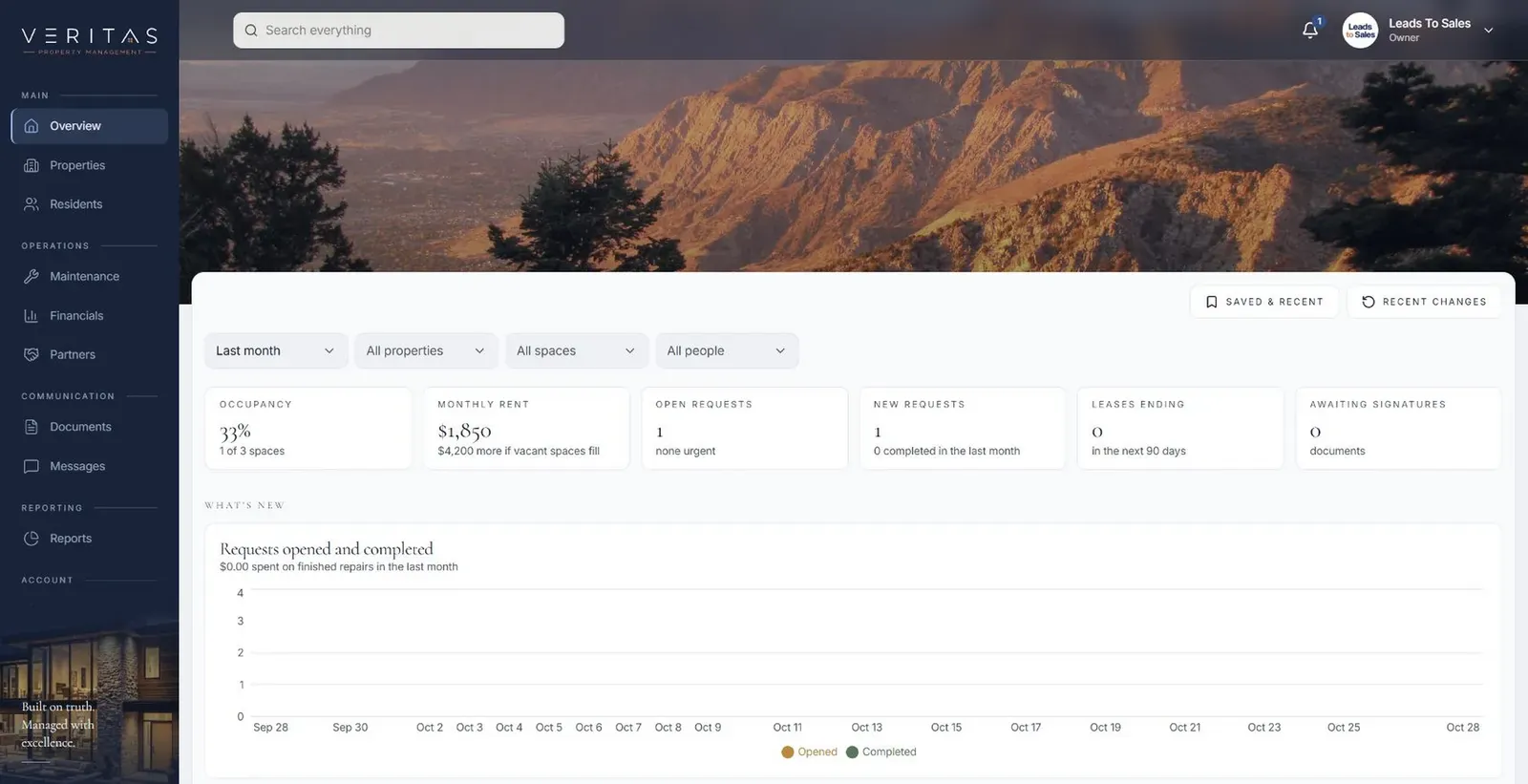
Many properties in one workspace, with each site's requests owned locally and visible to the people who need them.

All highlighted work →
Veritas Property ManagementVeritas Property Management portfolio overview with properties, occupancy and requests In build · Residential property managementVeritas Property ManagementTenants, owners and staff connected around the same requests, records and updates.View the project →

Start with the problem. We'll build the possibility.

Tell us what slows your team down. We'll map it with you and suggest a useful first release, whether you're in Dallas or anywhere in Dallas–Fort Worth.