
Dallas, TX
core service · dallas

Multi-location operations software for Dallas–Fort Worth groups

Opening a second or third location changes how work moves. The first office ran on habits and one shared spreadsheet. Now each site has its own copy, its own words for the same status, and its own idea of who handles what. You can see that things are slipping, but you cannot see where.

7 min read · 7 sections · 6 answers

Sites you can compare

Shared definitions mean a late item at one office means the same thing at every other.

Local routines respected

Each location sets its own owners, hours and checklists inside the shared model.

Clear next actions

Every item carries an owner and a next step, so stuck work is easy to spot.

Calmer, staged rollouts

A pilot at one site with its own staff shapes the system before others adopt it.

Oak Cliff Software builds multi-location operations software for Dallas–Fort Worth businesses and practice groups that run several sites. The goal is simple to say and harder to build: one shared view of the work, with room for how each office works. This page walks through the decisions that shape that kind of system, in the order we usually make them with you.

01

What usually breaks somewhere around location three

With one office, the owner knows the state of things by walking the floor. With two, a weekly call covers most of it. By the third, the picture splits. A regional manager asks each site for an update and gets three answers in three formats.

The trouble is rarely effort. Each location is working hard. They are just recording the work in ways that cannot be added together. One office calls a job "pending" when it is waiting on the customer. Another uses the same word when it is waiting on parts. A report that combines them tells you nothing.

That is the gap multi-location operations software is meant to close. Not by forcing every office into a single routine, but by giving everyone the same vocabulary and a place to record work that leaders can read across sites.

02

Decide what is shared and what stays local

The most useful hour in any project is the one where we sort your operations into two lists. The first list is what every site must define the same way so you can compare and help. The second is what each location should control for itself. Getting this split right matters more than any feature in multi-location operations software for Dallas businesses.

Here is how that split often looks for a group with offices in Plano, Arlington and Fort Worth:

  • Shared: the list of statuses, what counts as overdue, how a request is categorized, and which numbers leadership reviews.
  • Shared: the record itself, so a job or request looks the same no matter which office opened it.
  • Local: who owns each kind of work, which staff cover which hours, and the order a site handles its morning queue.
  • Local: checklists and routines that work for that office's layout, team size or customer mix.
  • Decided together: what happens when work moves from one site to another, and who is told.
// how multi-location operations software flows
  1. 1 Agree definitions
  2. 2 Configure each site
  3. 3 Pilot one location
  4. 4 Roll out
  5. 5 Compare and improve
03

Who owns the work, and who can see it

Every item in the system has a named owner and a next action. That sounds basic, but it is the part most spreadsheets lose. When a request sits for days, the question is not "what is the status" but "whose move is it." Good multi-site management starts there.

Access follows the same structure as your organization. Staff see their own location. Site leads see their team. Regional and executive leaders see across sites. We document who can see what before launch, so nobody is surprised later and sensitive records stay with the people who need them.

Each location configures its own owners within the shared model. If the Richardson office routes new requests to a front desk lead and the Denton office routes them to a coordinator, both work. The record and the statuses stay identical.

TodayWith multi-location operations software

✕Each office keeps its own spreadsheet and status words

✓One record and one status list across every location

✕Leaders call each site to find out what is late

✓A cross-site view shows exceptions with owner and next action

✕Transfers between offices happen by phone and vanish

✓Handoffs between sites are recorded and both ends are notified

✕New software forces one routine on everyone

✓Each location configures owners and routines within shared definitions

✕Opening a new site means building new spreadsheets

✓A new location is added through configuration

04

A cross-site view that points to the next action

Leaders do not need another chart. They need to know which site needs help today and what exactly is stuck. The cross-site view in our multi-location operations software for DFW groups is built around exceptions: work that is late, unassigned or waiting on something outside the team.

Because definitions are shared, comparisons are fair. If one office shows more overdue items, it means the same thing it would at any other site. From there, a leader can open the specific items, see the owner and decide whether to shift staff, call the site lead or let it ride.

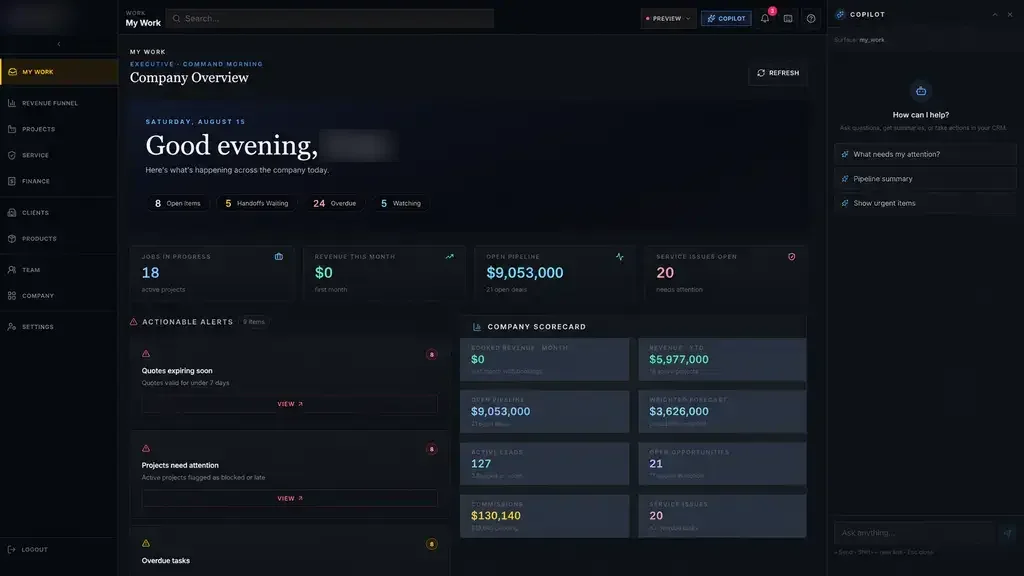
This is the same pattern behind our Industrial Operations Platform, where leadership sees exceptions such as a quote expiring or material running late, each with an owner and a next action. Different industry, same idea.

05

Pilot at one location, with the people who work there

Staff resist new tools that ignore how their office actually runs, and they are usually right to. So we do not launch everywhere at once. We pick one location, often the one with the most patient team or the clearest pain, and run the first release there.

During Build you see and test working software, not slides. During the pilot, the site's own staff use it on real work. We watch where they hesitate, where they fall back to the old spreadsheet, and which shared definitions need adjusting. Then we fix those things before the next site goes live.

Rolling out multi-location operations software in Dallas this way takes the fear out of the change. The second office hears from the first one that it works, which carries more weight than anything we could say.

The system handles

  • Rolling site data into one view
  • Flagging sites that fall behind
  • Assigning work by local rules

Your people decide

  • Local routines and decisions
  • Regional priorities
  • Rollout feedback
06

Adding the next location without a rebuild

A well built system treats a new location as configuration. You add the site, assign its owners and routines, set its access rules and invite its staff. The shared definitions, reports and cross-site view already know what to do with it.

That matters for any Dallas group buying multi-location operations software with growth in mind, say a new office in Frisco or McKinney next year. The software should be ready before the lease is signed, not something you scramble to extend afterward.

  • Site setup: name, hours, staff, owners and local routines.
  • Access: who at the new site sees what from day one.
  • History: whether existing records move in or start fresh.
  • Training: a short walkthrough led by someone from a site already live.
07

Working alongside the tools each office already uses

Most groups have something in place already: an accounting package, a point of sale, Google or Outlook calendars, a phone system. Good multi-location business software does not pretend those disappear. We connect to them where the vendor's APIs or integration options allow, so data moves without retyping.

When a connection is not possible, we say so plainly and design a simple handoff instead. You own the code and the data either way, and the operations management software we build for you stays yours to extend.
your first release

What a first multi-location operations software release includes

A focused starting point, shaped with your team in Discovery and adjusted to how your Dallas team works. Then we build on it.

  1. Discover
  2. Design
  3. Build
  4. Launch
  5. Optimize
Plan your first release →
release planMulti-Location Operations Software · v1.0Ready to scope
  • Agreed shared statuses, categories and definitions01
  • One shared work record for every location02
  • Owners and routines configured for the pilot site03
  • Access rules by location and role04
  • Cross-site exceptions view for leaders05
  • Pilot rollout plan with your staff06
Then: connect more tools, add automation and AI as your team is ready.
in practice

What multi-location operations software looks like day to day

Illustrative scenarios, not client stories.

A therapy group with four clinics

Imagine a therapy group with clinics in Plano, Garland, Irving and Grand Prairie. Each clinic schedules and follows up differently. A shared request record and status list lets the clinical director compare follow-up delays across sites, while each clinic keeps its own front desk routine. The system is built for HIPAA-regulated workflows, with staff limited to their own clinic.

Build something like this →Every system is shaped around your own process.
faq

Multi-Location Operations Software: questions we hear

Still unsure? Ask us directly.

What is multi-location operations software, and do we need it in Dallas?

It is a system that tracks your work across every location with shared definitions, while letting each site set its own owners and routines. Dallas–Fort Worth groups usually need it once leaders can no longer compare offices or see where work is stuck. If one spreadsheet still covers everything, you may not need it yet, and we will tell you so.

Will every office have to work the same way?

No. We standardize only what leaders need to compare sites, such as statuses, categories and the numbers reviewed each week. Each location configures who owns which work, its schedules and its daily routines inside that shared model. Most offices find they change less than they expected, because the system adapts to them rather than replacing how they operate.

How do you roll out to several sites?

We pilot at one location first, with the staff who will use the system every day. You test working software during Build, then the pilot site runs it on real work. We adjust definitions and screens based on what we learn, then roll out to the next sites in stages, often with a pilot staff member helping train them.

Can staff at one location see another location's records?

Only if you decide they should. By default, staff see their own site, site leads see their team, and regional leaders see across sites. We write down who can see what before launch and review it with you, so access matches your organization chart and sensitive records stay with the people responsible for them.

What does a first release usually include?

A focused first release covers the shared record, the agreed statuses, owners at each location, access rules and a cross-site view of exceptions. It runs at one pilot site first. Additional features, such as integrations, automated reminders or extra reports, are added once the core is in daily use and the team has told us what matters most.

Do you only build for multi-location businesses?

No. Multi-location work is our specialty, but we build custom software for single-site businesses across Dallas–Fort Worth as well. Many single-site clients plan to grow, and building with shared definitions from the start makes adding a second office later a matter of configuration rather than a new project.

often built together

Multi-Location Operations Software works best connected

Most teams start with one system and connect the next when they are ready. These are the services most often built alongside multi-location operations software, on the same record.

All services →

Start with the problem. We'll build the possibility.

Tell us what slows your team down. We'll map it with you and suggest a useful first release, whether you're in Dallas or anywhere in Dallas–Fort Worth.